


For years I cut by feel. I knew which offcuts were “good enough,” and I trusted my operators to make smart calls. Then I did a scrap audit and found we were throwing away more material than I’d ever guessed. That’s when I started looking at saw optimization software.
Here’s what I tried, what went wrong, and what I’d tell any shop owner thinking about it.
The Problem: Good Operators, Bad Math
My crew was experienced. The trouble was that nobody can mentally solve a cut list with dozens of lengths, mixed profiles and defects in the stock. Operators defaulted to whatever was fastest.
What I kept seeing:
- Offcuts that were just short of being usable
- Full sticks pulled when a leftover would have worked
- Jobs finishing a few parts short
- Everyone arguing about whose measurement was right
None of this was laziness. It was the limit of doing optimization in your head.
What I Tried First (And Why It Failed)
My first fix was a spreadsheet. I built a cut-list sheet that grouped parts by length and sorted them longest to shortest.
It helped a little, but I ran into three problems:
- It couldn’t account for blade kerf consistently.
- It didn’t handle defects in the material.
- It had no link to the saw, so someone still typed every number by hand.
Lesson #1: A spreadsheet plans the cuts. It doesn’t run them.
What Saw Optimization Software Actually Does
Once I looked at real saw optimization software, I understood the gap. Instead of leaving the plan on paper, the software calculates the best way to cut each stick and sends the lengths to the machine.
In plain terms, it:
- Combines parts from the cut list to fill each stick as fully as possible
- Accounts for blade kerf and trim
- Tracks leftovers so they can be reused
- Reduces how often an operator types in a number
I looked at how the RazorGage software is designed, because I wanted something my operators could learn without a week of training.
Walkthrough: How I Rolled It Out
Here’s the step-by-step process I followed. Some of it I’d do differently now.
Step 1: Clean Up the Cut Lists
I assumed the software would fix messy data. It doesn’t. My early jobs had inconsistent part names and missing quantities, so the results looked odd. I spent a few days standardizing profiles and lengths.
Step 2: Start with One Job Type
I didn’t switch the whole shop at once. I picked a repeatable window frame job and ran it through the optimizer while the old method ran in parallel. That gave me a fair comparison.
Step 3: Connect Planning to the Saw
This is where the real value showed up. A plan only helps if the saw follows it accurately. I wrote about this in another post on how a saw measuring system saves money.
If the positioning drifts, the optimization is wasted. I also covered how to get more accuracy from your cutting equipment, which is worth reading before you blame the software.
Step 4: Handle Defects
Door and window stock isn’t always perfect. Our wood profiles sometimes had knots or flaws. I explored the RazorOptimal crayon defecting system, which fits shops that mark defects and want the saw to cut around them.
Step 5: Train the Operators
I made a mistake here. I explained the what but not the why, so one operator kept overriding the plan. After I showed him the scrap comparison, he became the biggest fan.
Lesson #2: People follow the plan when they see the proof.
Where Saw Optimization Software Helped Most
After a few weeks, three improvements stood out.
Less Material Waste
The software found combinations I’d never have spotted. Fewer full sticks were pulled for small parts, and offcuts were used instead of binned.
Fewer Cutting Errors
Operators weren’t retyping lengths from paper, so we saw fewer transposed numbers and wrong cuts.
Faster Job Turnaround
With cuts sequenced sensibly, operators spent less time deciding what to cut next. The line kept moving.
What Didn’t Work
I want to be honest about the downsides:
- Bad inputs gave bad outputs. Wrong part data meant wrong cuts.
- It wasn’t magic. Poor saw accuracy can undo a great plan.
- There was a learning curve. My first week was slower, not faster.
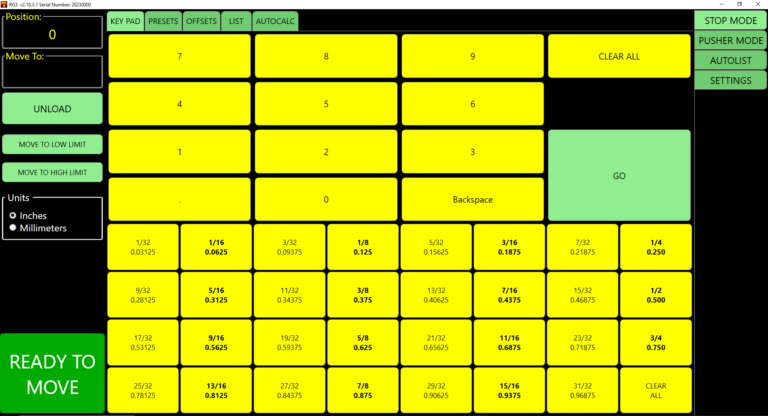
The software also works best when the hardware cooperates. For shops using a pocket-hole workflow, the RazorOptimal pocket hole saw system shows how cutting and drilling can be tied together. For positioning, I also looked at the RazorGage RG3 positioner.
If your job involves angles, I shared my thoughts on the RazorGage AngleMaster in a separate review.
The Result
After a couple of months, our scrap pile was noticeably smaller and our cut lists were cleaner. Estimating got easier too, because I trusted the material numbers.
Final Thoughts on Saw Optimization Software
If you cut door or window profiles all day, saw optimization software can pay for itself through less waste, fewer mistakes and smoother production. Just clean up your data first, test on one job type, and make sure your saw can hold accuracy.
Want to talk through your shop’s setup? Request a quote or contact our team.
FAQ
What is saw optimization software?
It’s a program that plans the most efficient way to cut stock to a parts list, reducing waste and sending lengths to the saw.
Is saw optimization software worth it for a small shop?
In my experience, yes, if you cut repeat jobs or lose material to offcuts. Start with one job type and measure the savings.
Does the software work with any saw?
Not always. Check compatibility with your saw, positioner and controls before buying.
Can it account for defects in the material?
Some systems can, especially when paired with defect-marking tools. Ask the vendor what’s supported.
How long does it take to see results?
I noticed differences within a few weeks, but my first week was slower while the team learned.
Contact Us
Address: 57006 241st Street, Ames, IA 50010
Phone: 515.232.3188
Email: sales@RazorGage.com