


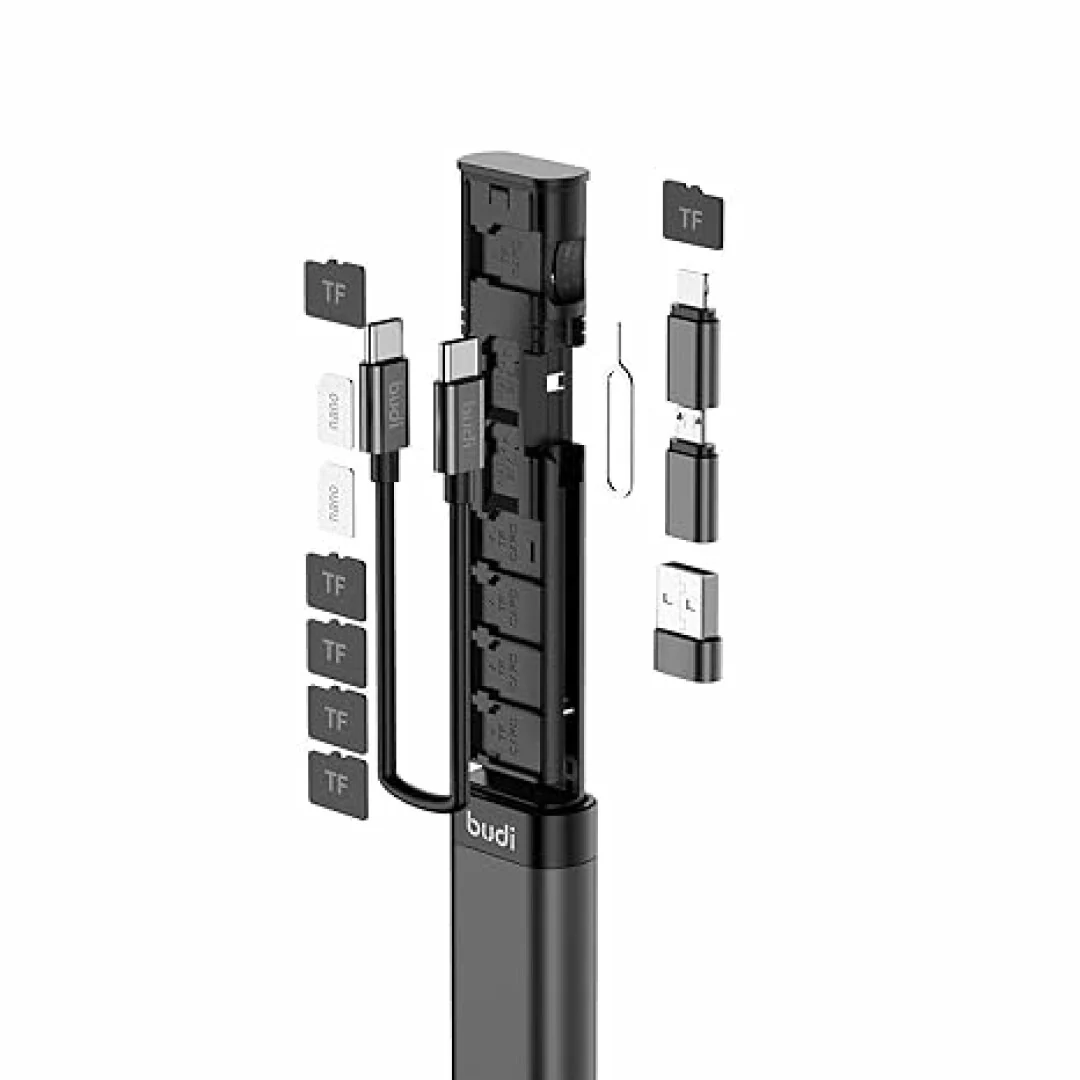
Modern phones, older car stereos and wired headphones don’t always mix. One has a USB-C port, the other has only a 3.5mm socket and the third needs Bluetooth. The correct adapters make this problem disappear quickly and cheaply. This guide explains the correct adapters for each scenario and gives an option from the Ace-Tek adaptors collection.
Why You Need a Universal 8 in 1 Adapter Kit
A Universal 8 in 1 Adapter Kit is one of the most useful accessories you should have somewhere in a bag, glovebox or desk drawer. Instead of buying different connectors each time you change devices, an all-in-one set can cover many common connection types.
Key Benefits of an All-in-One Adapter Kit
• Saves money: only one purchase is needed to replace several single-use adapters.
• Saves space: everything is kept together in one compact set.
• Works across devices: useful for phones, tablets, laptops, speakers and car audio.
• Great for travel: you are prepared for different ports and setups wherever you go.
• Reduces frustration: you won’t be caught without the connector you need.
Understanding Aux Connections and Adapters
The 3.5mm auxiliary (aux) port is still one of the most common audio connections. Many cars, home stereos, speakers and headphones use this, so it’s worth knowing what each aux adapter can do.
What Is an Aux Splitter Adapter?
An aux splitter adapter takes one 3.5mm output and makes it two or more outputs. This lets two people plug in their headphones to the same phone or tablet, which is ideal for:
1. Sharing a film or show on a long journey.
2. Listening to music together without using speakers.
3. Connecting headphones and a speaker to one source.
What Is an Aux to Stereo Adapter?
An aux to stereo adapter connects a 3.5mm headphone-style output to a stereo system, often using left and right audio plugs. It’s the simple way to play music from a phone, laptop or tablet on a home hi-fi or amplifier.
Choosing an Aux Cable for Phone to Stereo
If you want to play music directly from your handset, an aux cable for phone to stereo is the easiest option. Before you buy, be sure to consider these:
• Connector type: make sure the ends match your phone and stereo (3.5mm, RCA or other).
• Cable length: choose a length that’s comfortable for your room or car without leaving extra.
• Build quality: look for strong connectors and a sturdy cable that won’t tangle.
• Phone compatibility: if your phone doesn’t have a headphone jack, you’ll also need a USB-C or other adapter.
Going Wireless: Bluetooth Adapters for Your Car
Many drivers have a reliable car stereo that predates Bluetooth. Instead of buying a new one, a little plug-in device can give you wireless audio.
How an Aux Bluetooth Adapter for Car Stereo Works
An aux Bluetooth adapter for car stereo plugs in your car’s 3.5mm socket and connects wirelessly to your phone. Once paired, music, podcasts and navigation prompts can be played through your speakers without having a cable. Most adapters also offer a way to take calls hands-free, but the available features can vary across models.
Aux In Bluetooth Car Adapter vs Auxiliary Input Bluetooth Adapter
You may have seen either name in shops, but they usually describe the same product. An aux in bluetooth car adapter or auxiliary input bluetooth adapter receives audio from your phone and feeds it into the stereo’s aux input. When looking at different options, pay attention to:
1. Power source: some use a USB connection in the car; others have a rechargeable battery.
2. Pairing: automatic pairing can save you effort every time you start the car.
3. Audio quality: a stable connection and good Bluetooth version can reduce dropouts.
4. Hands-free calling: a built-in microphone is useful if you want to take calls while driving.
Solving the Missing Headphone Jack Problem
Many newer phones and tablets are ditching the 3.5mm socket completely. If you still prefer to use wired headphones, the answer is simple.
Using a USB C to Headphone Jack Adapter
A USB C to headphone jack adapter connects your wired headphones or aux cable to a USB-C port. It also allows you to connect an aux cable to your phone and car or home stereo.
To use one, simply:
1. Plug the adapter into your phone’s USB-C port.
2. Connect your headphones or aux cable to the 3.5mm end.
3. Play your music and adjust the volume on your phone.
Compatibility can vary from phone to phone, so bear that in mind before buying.
Which Adapter Is Right for You?
Use this quick guide to help choose the correct adapter for your needs:
• Sharing audio with a friend: aux splitter adapter
• Playing phone music on a home stereo: aux to stereo adapter
• Wired connection in the car: aux cable for phone to stereo
• Wireless audio in an older car: aux bluetooth adapter for car stereo
• Phone with no headphone socket: USB C to headphone jack adapter
• Many devices and connection types: Universal 8 in 1 Adapter Kit
Tips for Getting the Best Sound
• Turn your phone volume up high and control loudness with the stereo.
• Avoid letting cables run over power leads to avoid interference.
• Use well-made connectors – loose plugs can cause crackling.
• Keep Bluetooth adapters charged or powered for stable performance.
• Take care of your adapters by storing them in a case to keep them tidy and undamaged.
Final Thoughts
You don’t need to be investing in new kit to get great audio. With a few well-chosen adapters, almost any phone can connect to almost any stereo in either a wired or wire-free way. For the best value and variety, a Universal 8 in 1 Adapter Kit along with the correct Bluetooth or aux solution should cover most scenarios.
Browse the full range of connectors, cables and Bluetooth receivers in the Ace-Tek adaptors collection and find the right fit for your devices today.