


Healthcare providers handle hundreds of routine questions every week. Patients want to know when a clinic is open, which insurance plans it accepts, how to prepare for an appointment, and how to contact the right department. Answering these questions takes time away from other administrative tasks.
An AI chatbot for healthcare can help clinics manage these everyday conversations by providing quick answers, sharing approved information, and collecting basic appointment requests. It can support patients outside normal office hours while helping front-desk teams manage repetitive enquiries.
However, healthcare is a sensitive industry. A chatbot should not replace medical professionals, diagnose conditions, recommend treatments, or handle emergencies. Its role should be clearly defined: make routine communication easier while directing clinical and sensitive questions to qualified staff.
This guide explains how healthcare AI chatbots work, where they can help, what to consider before implementing one, and how smaller practices and digital agencies can get started.
What Is an AI Chatbot for Healthcare?
An AI chatbot for healthcare is a conversational tool that helps patients and website visitors find information about a healthcare provider’s services, facilities, policies, and administrative processes.
Unlike a basic chatbot that relies entirely on fixed buttons and scripted responses, an AI-powered chatbot can understand questions phrased in different ways and generate answers using information provided by the healthcare organisation.
For example, a patient might ask:
- “What time does your clinic close?”
- “Do you accept my insurance provider?”
- “What should I bring to my first appointment?”
- “How can I request an appointment?”
- “Where can I park near the clinic?”
The chatbot can answer these questions when the relevant information has been included in its approved training content.
A healthcare chatbot can support communication, but it should not be treated as a doctor or an independent source of medical advice. Questions about symptoms, diagnosis, medication, treatment decisions, or urgent health concerns should be directed to an appropriate healthcare professional or emergency service.
How Does an AI Healthcare Chatbot Work?
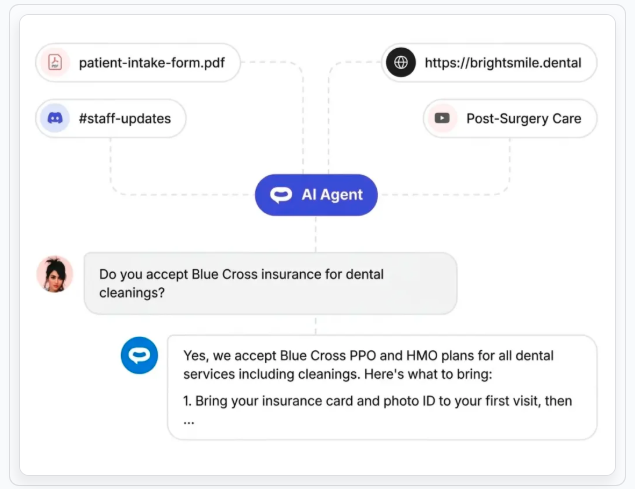
An AI healthcare chatbot typically combines natural language processing, a language model, and a knowledge source containing information approved by the healthcare provider.
The process generally follows four steps.
1. A patient asks a question
A visitor opens the chatbot on a clinic’s website and types a question in everyday language. They do not need to select an exact menu option or use a predefined command.
2. The chatbot interprets the request
The AI identifies the likely intent behind the question. For example, it may recognise that “Are you open on Sunday?” is a question about clinic operating hours.
3. The chatbot checks its approved information
The system uses its configured knowledge sources, such as website pages, frequently asked questions, service descriptions, and approved patient information documents.
The quality of the answer depends on the accuracy and relevance of this information. Outdated opening hours or incorrect insurance details can lead to misleading responses, so the knowledge source needs regular review.
4. The chatbot responds or directs the patient to staff
For routine administrative questions, the chatbot provides an answer. If a question is clinical, urgent, sensitive, or outside its approved scope, it should explain its limitations and direct the visitor to the appropriate person or service.
This combination of automated responses and human support is important. The aim is not to automate every conversation; it is to make straightforward communication easier while ensuring that more complex questions receive proper attention.
Why Are Healthcare Providers Using AI Chatbots?
Healthcare providers are exploring chatbots because patients increasingly expect convenient access to basic information. At the same time, administrative teams need ways to manage repetitive enquiries without compromising the quality of patient communication.
Here are some of the main potential benefits.
24/7 access to routine information
Patients may visit a clinic website outside office hours. A chatbot can answer approved questions about services, location, operating hours, and appointment-request procedures at any time.
This does not mean that clinical staff are available around the clock. The chatbot should make its availability and limitations clear.
Fewer repetitive phone enquiries
Questions about opening hours, directions, accepted services, and appointment procedures can take up a significant amount of front-desk time.
When a chatbot answers these routine questions, staff may have more time to focus on calls and conversations that need personal attention.
More convenient appointment enquiries
A chatbot can explain how to request an appointment and, where the configured workflow allows, collect basic contact details and preferred appointment times.
Whether it can actually check availability or confirm a booking depends on the scheduling system and integration in place. Collecting an appointment request is not the same as confirming an appointment.
Consistent patient communication
A chatbot trained on current, approved information can provide consistent answers to common questions. This can help reduce differences in how routine information is communicated across website visitors and enquiries.
The information still needs to be reviewed by the practice. AI-generated responses should not be assumed to be accurate simply because they sound confident.
Insights into common patient questions
Chatbot analytics can help a practice identify the topics visitors ask about most often. For example, a clinic may discover that many visitors need clearer information about insurance, parking, or preparation for appointments.
These insights can inform website updates and improvements to the patient communication process.
10 Practical Use Cases of AI Chatbots in Healthcare
The most useful healthcare chatbot applications often involve routine information and administrative support. The following examples show where automation can help without giving the chatbot responsibility for clinical decisions.
1. Answering frequently asked questions
A chatbot can respond to common questions about:
- Clinic opening hours
- Contact information
- Clinic location and parking
- Available services
- Department details
- General appointment procedures
For example, if a visitor asks, “Do you offer dental cleaning?”, the chatbot can explain the service using the clinic’s approved service description.
2. Collecting appointment requests
A chatbot can guide visitors through an appointment enquiry by collecting basic details such as their name, contact information, and preferred date or time, provided the system is configured and approved for that purpose.
The request can then be passed to the appropriate scheduling team.
Practices should avoid collecting unnecessary sensitive details in a general website chatbot. In particular, visitors should not be encouraged to enter symptoms, diagnoses, medical histories, or other sensitive health information unless the system has been specifically assessed and configured to handle it.
3. Sharing insurance and billing information
Patients often need basic information about accepted insurance providers, payment methods, billing procedures, and where to direct billing questions.
A chatbot can share the practice’s published policies and explain how to contact the billing team.
It should not promise that a particular treatment or procedure is covered for an individual patient. Coverage depends on the patient’s policy and circumstances and should be verified with the insurer or billing team.
4. Explaining healthcare services
Visitors may not know which services a clinic provides or which department handles a particular type of enquiry.
A chatbot can explain general service descriptions and direct visitors to the appropriate department or contact channel.
It should not make a clinical assessment or decide which treatment a patient needs.
5. Providing general appointment preparation information
A clinic may have approved instructions explaining what patients should bring to an appointment, where to check in, or how early to arrive.
A chatbot can share these instructions and link to the relevant information page.
Instructions involving medication changes, fasting, or individual medical circumstances should be handled carefully. The chatbot should direct patients to their healthcare professional when personal guidance is needed.
6. Sharing general post-visit instructions
Healthcare providers may publish general post-visit information, such as contact details for follow-up questions or instructions on where to find official care documents.
A chatbot can help visitors locate this approved information.
It should not interpret a patient’s symptoms after a procedure, change treatment instructions, or tell someone whether a complication is serious. Those questions require appropriate clinical assessment.
7. Directing visitors to the right department
Large clinics and multi-specialty practices may have several departments and contact channels.
A chatbot can help visitors find the right destination for administrative enquiries, such as billing, appointment changes, medical records requests, or general service information.
For sensitive matters, it should provide a secure and appropriate contact route rather than asking the visitor to disclose private details in the chat.
8. Capturing general enquiries
A chatbot can collect basic contact details from people who want more information about a service or wish to be contacted by the practice.
This can help a clinic organise enquiries and follow up with prospective patients.
The form should collect only information that is necessary for the stated purpose, and visitors should understand how their information will be used.
9. Supporting visitors outside office hours
A chatbot can provide general information when reception staff are unavailable. It can explain normal contact hours, share the clinic’s address, and tell visitors how to submit a non-urgent enquiry.
It must also make clear that it is not an emergency service. If a visitor describes an emergency or potentially urgent symptoms, the chatbot should direct them to local emergency services or an appropriate urgent-care channel rather than continuing a routine conversation.
10. Helping staff identify gaps in website information
Repeated unanswered questions can reveal missing or unclear information on a clinic’s website.
For example, if visitors frequently ask whether a clinic accepts a particular insurance provider, the practice may need to improve its insurance information page.
Reviewing chatbot conversations and unanswered-question reports can help teams decide what information to update.
How Small Healthcare Practices Can Benefit From AI Chatbots
AI chatbots are not only relevant to large hospitals. Smaller healthcare organisations may also benefit from automating routine website enquiries.
Dental clinics
A dental clinic can use a chatbot to share information about its services, opening hours, location, accepted payment methods, and appointment-request process.
It can also direct visitors to approved information about general appointment preparation.
Diagnostic centres
Diagnostic centres receive questions about locations, operating hours, available tests, and appointment procedures. A chatbot can share published information and direct visitors to the right team for test-specific or personal questions.
It should not interpret test results or recommend tests based on symptoms.
Specialist practices
A specialist clinic can use a chatbot to explain its services, introduce departments, share general appointment information, and collect basic enquiries.
Questions requiring medical judgement should be passed to qualified staff.
Multi-location clinics
Practices with multiple branches can use a chatbot to help visitors find the correct address, opening hours, and contact information for each location.
The underlying information should be maintained carefully so visitors do not receive outdated details.
For smaller practices, the key is to begin with a limited set of low-risk tasks. Automating frequently asked questions and general appointment enquiries is often a more manageable starting point than attempting to automate complex patient interactions.
How Digital Agencies Can Use Healthcare AI Chatbots for Clients
Digital agencies that build websites, manage online marketing, or provide digital transformation services can offer healthcare chatbot implementation as an additional service.
A healthcare AI chatbot can complement a client’s website by making routine information easier to access and helping organise incoming enquiries.
Agencies can support healthcare clients by:
- Identifying the most common questions visitors ask.
- Organising approved website content and FAQs.
- Configuring chatbot instructions and response boundaries.
- Customising the chatbot to match the client’s brand.
- Setting up appropriate enquiry and lead-capture workflows.
- Testing responses before launch.
- Reviewing analytics and improving the chatbot over time.
Agencies should also establish clear responsibilities with each client. The healthcare provider must approve clinical and administrative content, define escalation procedures, and determine what information may be collected.
The agency should not independently create medical guidance or promise that a chatbot meets regulatory requirements without a proper technical and legal assessment.
How to Train an AI Chatbot for Healthcare Using Approved Information
Training and configuration are among the most important parts of deploying a healthcare chatbot. A chatbot is only as useful as the information it can access and the boundaries it follows.
Here is a practical process.
1. Start with public-facing website content
Begin with information the clinic has already approved for visitors, including:
- About and contact pages
- Service descriptions
- Clinic locations
- Operating hours
- Appointment procedures
- Insurance and billing FAQs
This gives the chatbot a consistent starting point.
2. Add approved FAQs and patient information documents
A practice may have useful information in PDF documents, brochures, or internal FAQ files.
Before adding these materials, check that they are current, approved for public use, and do not contain patient-specific information or unnecessary sensitive data.
3. Define what the chatbot can and cannot answer
Clear instructions help establish the chatbot’s role.
For example, it may be instructed to:
- Answer general questions using approved practice information.
- Avoid diagnosing symptoms or recommending treatment.
- Avoid making medication recommendations.
- Direct personal medical questions to qualified staff.
- Provide emergency guidance when a conversation indicates an urgent situation.
- Avoid guessing when the answer is not available.
4. Create a human handoff process
Decide where visitors should go when the chatbot cannot help.
This may include a clinic phone number, an approved contact form, a secure patient portal, or a designated staff member.
The escalation route should be easy to understand and should not require the visitor to disclose unnecessary sensitive information.
5. Test real-world questions before launch
Test the chatbot with a variety of questions, including:
- Questions it should answer directly.
- Questions with missing information.
- Questions about services the clinic does not offer.
- Personal medical questions.
- Questions about medication or treatment.
- Emergency-related messages.
- Attempts to make the chatbot provide information outside its role.
Check whether it answers accurately, admits when it does not know, and directs visitors to the correct human support channel.
6. Review and update its information regularly
Clinic hours, insurance policies, service descriptions, and appointment procedures can change.
Assign someone to review the chatbot’s knowledge sources and test important questions periodically. Remove outdated documents and update information whenever the practice changes its policies or services.
Healthcare Chatbots, Patient Privacy, and HIPAA: What Businesses Should Know
Privacy and data protection should be considered before a healthcare chatbot is launched, not after it begins collecting information.
Healthcare conversations may contain sensitive personal information. Even a seemingly simple appointment enquiry can reveal details about a person’s health or treatment.
The right privacy requirements depend on where the healthcare provider operates, what information the chatbot collects, how that information is used, and which vendors or systems process it.
What should healthcare providers consider?
Before deploying a chatbot, review the following areas:
Data collection: Collect only the information needed for the chatbot’s stated purpose. Avoid asking visitors to enter symptoms, diagnoses, medical histories, or other sensitive information into a general-purpose website chat.
Data storage and retention: Understand whether conversations are stored, how long they are retained, and how they can be accessed or deleted.
Access controls: Limit access to conversation records and personal information to authorised people.
Vendor and integration review: Check how the chatbot provider, hosting services, AI services, and connected systems handle information. Review relevant contracts and data-processing arrangements.
Transparency: Explain what information is collected, why it is collected, and how visitors can contact the practice about privacy questions.
Human oversight: Establish a process for staff to review escalated conversations and respond to enquiries that the chatbot cannot handle.
Does a healthcare chatbot need to be HIPAA compliant?
HIPAA is a United States law that applies to covered entities and business associates in defined circumstances. It does not automatically apply to every healthcare business or every chatbot.
If a chatbot vendor creates, receives, maintains, or transmits electronic protected health information on behalf of a HIPAA-regulated organisation, the vendor may have business associate obligations. A HIPAA-compliant business associate agreement may be required, along with appropriate safeguards and the healthcare organisation’s own risk analysis.
A signed Business Associate Agreement (BAA) alone does not make an entire chatbot deployment HIPAA compliant. The provider must assess the complete service, data flows, access controls, connected vendors, and operational processes.
For organisations outside the United States, other privacy and healthcare regulations may apply. Businesses should seek jurisdiction-specific legal and compliance advice before collecting or processing patient information.
For a lower-risk public-facing chatbot, one practical approach is to limit its role to general practice information and route sensitive conversations to an approved patient portal or another secure channel.
Why Human Handoff Is Essential in Healthcare Chatbots
Automation should not remove access to human support. In healthcare, some conversations need professional judgement, empathy, or access to information that a public-facing chatbot should not handle.
A chatbot should direct visitors to a person or an appropriate service when they:
- Ask for a diagnosis or treatment recommendation.
- Describe potentially urgent or emergency symptoms.
- Ask whether they should start, stop, or change medication.
- Need help interpreting test results.
- Raise a complaint or a sensitive personal concern.
- Ask a question that is not covered by approved information.
- Request access to private medical records.
The handoff process should explain what the visitor needs to do next. Depending on the situation, that may mean contacting the clinic, using a secure patient portal, speaking with a qualified healthcare professional, or contacting emergency services.
Healthcare providers should test these escalation rules regularly. A chatbot that gives useful answers to routine questions but fails to recognise when it should stop is not ready for deployment.
How to Set Up an AI Chatbot for a Healthcare Website
A healthcare chatbot project does not need to begin with a complicated system. A focused implementation can help a practice test the value of automation while keeping its scope manageable.
Step 1: Choose a clear objective
Decide what the chatbot should improve. Possible objectives include reducing repetitive enquiries, making clinic information easier to find, or collecting basic appointment requests.
Avoid trying to automate every patient interaction at the beginning.
Step 2: Identify the questions it should answer
Review website enquiries, reception calls, and existing FAQs to identify recurring administrative questions.
Prioritise questions with clear, approved answers.
Step 3: Select a suitable chatbot platform
Evaluate platforms based on their training options, customisation, integrations, analytics, privacy controls, support for human handoff, and ability to restrict the chatbot’s scope.
If the deployment may involve regulated health information, assess the specific product, plan, configuration, and vendor arrangements before using it for that purpose.
Step 4: Add approved knowledge sources
Connect the chatbot to relevant website pages and upload approved documents where supported.
Review the source content before making it available to visitors. Do not upload patient records or confidential documents into a general-purpose chatbot.
Step 5: Configure its instructions and boundaries
Tell the chatbot which topics it can answer and which questions it must escalate.
Include clear instructions not to diagnose, prescribe, interpret individual medical results, or invent information.
Step 6: Configure contact and enquiry workflows
If the practice wants to collect appointment requests or general enquiries, define exactly what information is needed and where it will be sent.
Use an appropriate secure process for sensitive information. Do not assume that a standard website form or chat transcript is suitable for collecting medical details.
Step 7: Test the chatbot
Ask staff to test normal questions, unusual wording, incomplete requests, and questions outside the chatbot’s scope.
Check the accuracy of its responses, privacy behaviour, and escalation process.
Step 8: Launch and monitor performance
Start with a limited rollout. Review unanswered questions, incorrect responses, handoff activity, and visitor feedback.
Use these findings to improve the content and instructions before expanding the chatbot’s responsibilities.
How to Measure the Success of a Healthcare AI Chatbot
A chatbot should be evaluated on more than the number of conversations it handles. The most useful measures show whether it is helping visitors and supporting staff without creating additional risk.
Consider tracking these metrics:
| Metric | What it tells you |
|---|---|
| Conversation volume | How often visitors use the chatbot |
| Common questions | Which topics visitors need help with |
| Unanswered questions | Where the knowledge base needs improvement |
| Response accuracy | Whether answers match approved information |
| Human handoff rate | How often visitors need staff assistance |
| Enquiry completion rate | Whether visitors successfully submit appropriate requests |
| Visitor feedback | How useful people find the experience |
| Staff feedback | Whether the chatbot reduces repetitive work or creates extra tasks |
Do not treat a low handoff rate as an automatic sign of success. In healthcare, an appropriate handoff is often the correct outcome.
Review a sample of conversations regularly, using suitable privacy controls. The goal is to improve the quality of patient communication, not simply maximise automation.
How to Choose the Best AI Chatbot for Healthcare
The best platform depends on the practice’s needs, technical environment, privacy requirements, and intended use cases.
Use this checklist when comparing options.
Knowledge-base training
Can the chatbot use approved website content, FAQs, and documents? Can the practice update or remove information when it changes?
Customisation
Can the chatbot match the clinic’s branding and website design? Can the team configure its tone, instructions, and response boundaries?
Human handoff
Can visitors easily reach the clinic when they need help from a person? Can the practice decide which topics should be escalated?
Privacy and security
Does the provider clearly explain data collection, storage, retention, access, and third-party processing? If regulated information is involved, can the vendor support the required contractual and technical arrangements for the specific product and plan?
Integrations
Can the chatbot connect to the tools the practice already uses? Confirm whether integrations support information sharing, appointment requests, live availability checks, or confirmed bookings. These are different capabilities.
Analytics
Can the team identify common questions, unanswered queries, and areas where the chatbot needs improvement?
Pricing and scalability
Does the pricing suit the practice’s size and expected conversation volume? Can the service support additional locations or workflows as the organisation grows?
A good platform should make it easy to start with routine questions, maintain control over the information provided, and involve staff whenever a conversation needs human attention.
How AI-Chatbot.ai Can Help Healthcare Providers
Healthcare providers looking to automate routine website communication can explore AI-Chatbot.ai’s healthcare chatbot solution.
The platform’s healthcare offering focuses on answering common practice questions, supporting appointment enquiries, and providing visitors with information about services, billing, and insurance.
Relevant capabilities include:
- AI training: Configure the chatbot using website content, FAQs, service descriptions, and approved documents.
- Lead capture: Collect basic contact information and appointment requests through configured workflows.
- Brand customisation: Adapt the chatbot’s appearance to match the healthcare provider’s website.
- Analytics: Review chatbot activity and identify questions that may need clearer answers.
- Human support workflows: Direct visitors to the appropriate team when their questions need personal attention.
You can also explore the AI healthcare chatbot use case to see how these capabilities can support routine patient communication.
Before using any chatbot to collect or process sensitive health information, review the specific product configuration, data handling practices, and applicable compliance requirements. Keep a public-facing chatbot focused on general information unless the complete system has been assessed and approved for a broader role.
Frequently Asked Questions
What is an AI chatbot for healthcare used for?
An AI chatbot for healthcare can answer routine questions about clinic hours, services, locations, insurance information, appointment procedures, and general practice policies. Depending on its configuration, it may also collect basic appointment requests and direct visitors to the appropriate staff member.
Can an AI healthcare chatbot book appointments?
Some chatbots can collect appointment requests, while others can connect to scheduling systems to check availability or confirm bookings. These capabilities depend on the platform and integrations. A chatbot that collects a preferred date and time has not necessarily booked an appointment.
Can healthcare chatbots provide medical advice?
A general-purpose website chatbot should not diagnose conditions, prescribe medication, or make individual treatment decisions. It should share only approved general information and direct clinical questions to qualified healthcare professionals.
Are AI chatbots for healthcare HIPAA compliant?
Not automatically. HIPAA applies to covered entities and business associates in defined circumstances. Compliance depends on the information involved, the services and vendors used, the applicable agreements, safeguards, and the organisation’s own processes. A BAA by itself does not guarantee that a complete deployment is compliant.
Can small clinics use AI chatbots?
Yes. Small clinics can begin with straightforward tasks such as answering FAQs, sharing opening hours, explaining services, and collecting basic appointment enquiries. They should define clear limits and provide an easy way to reach staff.
How do you train a healthcare chatbot?
Start with approved website content, FAQs, service descriptions, and public-facing documents. Set clear instructions about what the chatbot can answer, define escalation rules, test it with realistic questions, and review its responses regularly.
What should a healthcare chatbot do when a patient describes an emergency?
It should not attempt to diagnose or manage the emergency. It should clearly direct the person to local emergency services or an appropriate urgent-care channel. Emergency instructions should be reviewed and approved by the healthcare provider.
An AI chatbot for healthcare can make routine patient communication more convenient while helping practices manage repetitive administrative enquiries. It can answer common questions, share approved information, collect basic appointment requests, and help visitors find the right contact channel.
The most effective approach is to start with a clearly defined purpose. Train the chatbot on accurate information, limit what it is allowed to answer, protect visitor data, and make human support easy to access.
For clinics and digital agencies, a carefully scoped chatbot can be a practical addition to a healthcare website. The priority should always be useful communication, patient privacy, and appropriate human oversight—not automating medical decisions.